
Project management
2
min read

The PowerTrack Lifecycle: From Engineering Data to Field Execution & Intelligence

Managing electrical construction projects means juggling engineering data, field crews, material logistics, and real-time progress reporting—often across disconnected spreadsheets and paper workflows. PowerTrack bridges that gap by transforming raw engineering schedules into actionable work packages, capturing installation progress at the source, and surfacing productivity intelligence in real time. Here's how data flows through the four layers of the PowerTrack lifecycle, from initial ingestion to client handover.
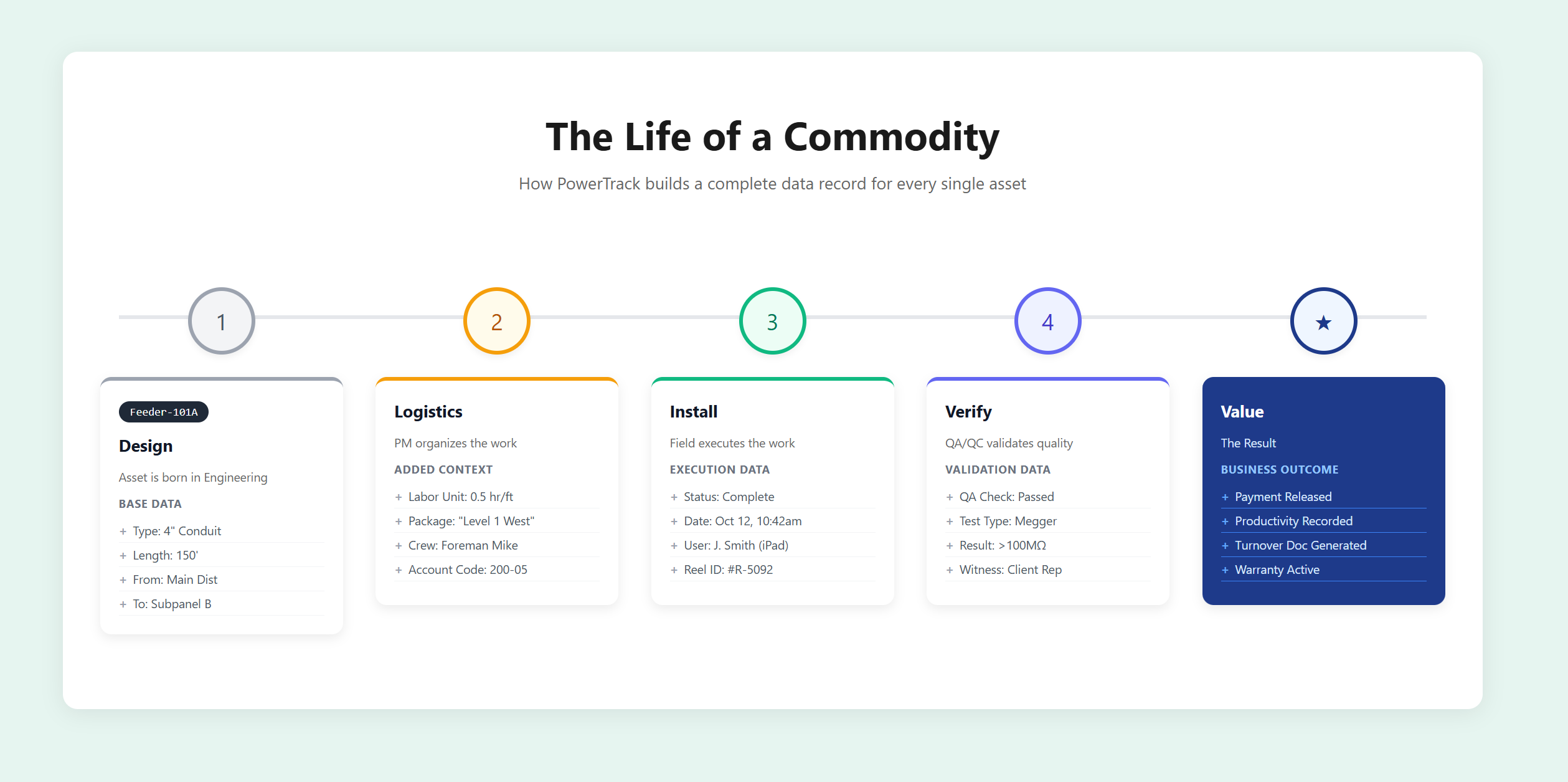
Managing electrical construction projects means juggling engineering data, field crews, material logistics, and real-time progress reporting—often across disconnected spreadsheets and paper workflows.
PowerTrack bridges that gap by transforming raw engineering schedules into actionable work packages, capturing installation progress at the source, and surfacing productivity intelligence in real time.
Here's how data flows through the four layers of the PowerTrack lifecycle, from initial ingestion to client handover.
1

Ingestion & Foundation

Office / Admin

Every project starts with engineering data. PowerTrack ingests your schedules directly—no manual re-entry—and establishes the baseline for tracking everything that follows.

Commodity Schedule Import

Directly ingest engineering schedules (Cables, Conduits, Equipment) and detect changes between versions.

Labor Unit Definition

Establish the baseline for earned value by assigning labor expectations to specific commodity types.

Project Configuration

Define Area Codes, System Codes, and Account Codes to align with financial and site standards.

2

Planning & Logistics

General Foreman / PM

Raw commodity lists don't build themselves. This layer transforms engineering data into executable work packages—grouped, assigned, and ready for the field.

Work Packaging

Group commodities into logical Packages (by Room, System, Priority) to organize field execution.

Foreman Assignment

Assign packages to specific crews to establish accountability and enable productivity tracking.

Commodity & Reel Management

Track cable reel inventory and assign specific reels to cable runs for precise material control.

3

Field Execution & Quality

Foreman / Crews

This is where the work happens. PowerTrack meets your crews where they are—whether that's an iPad in hand or printed install cards with QR codes—and captures progress the moment it occurs.

Digital & Print Workflows

Execute work via iPad or printed Install Cards with QR codes for instant status updates.

Restraint Management

Log "Blocked Work" immediately to justify schedule impacts and potential change orders.

QA/QC & Status

Capture installation status and required QA tests at the source, eliminating end-of-job scrambling.

4

Real-Time Intelligence

Executive / PM

Data captured in the field flows directly into your productivity engine. No waiting for weekly reports. No trusting gut feelings. Just real numbers showing exactly where you stand.

Productivity Engine

Compare Earned Value (Installations) vs. Burned Hours (Timesheets) to track performance by crew and commodity.

Progress Projections

Visualize installation velocity to predict completion dates based on actual field performance.

Commissioning & Handover

Generate comprehensive Turnover Packages and QA/QC documentation for client acceptance.

Every installation. Every status update. Every hour logged. It all flows through a single system—giving you complete visibility from engineering handoff to client turnover.

"This is the best of the best. I could have run any project in my career with this software and had total control."

— Tom Mayo, 50+ Year Industry Veteran

PowerTrack: Data-Powered Situational Awareness

See PowerTrack in action

Whether you're planning your next major electrical installation or exploring better project intelligence tools, let's show you how PowerTrack can transform your project tracking and stakeholder relationships.

Thank you! Your request is on its way!
Oops! There was an error with your submission.